



























If your hands ache after a day on the keyboard or trackpad, you’re not alone. Wrist and Hand Mobility for Desk Workers means keeping your wrists, thumbs, and fingers moving through comfortable, pain-free ranges while you type, click, and swipe—all day. The fastest way to improve is simple: set up a neutral desk position, take frequent microbreaks, and rotate a handful of short drills two or three times a day. In plain terms, mobility is the ability to move joints with control; for desk work, that’s smooth wrist flexion/extension, forearm rotation, and dexterous fingers without tingling or stiffness. Here’s a quick-start 60-second routine: relax your shoulders, make 5 gentle fist-to-open cycles, do 5 wrist circles each way, press palms together for a 15-second “prayer” stretch, then spread fingers wide for 5 seconds. Use the numbered sections below to build your own plan safely. (For medical concerns, numbness, or persistent pain, check in with a clinician first.)
1. Set Your Desk For Neutral Wrists (The Foundation)
Neutral setup is the easiest, highest-ROI move: your wrists stay straight and in line with your forearms, your elbows float at roughly 90–120°, and your shoulders relax so your hands can move freely. That single change reduces strain from constant mouse and typing tasks. Start by lowering your keyboard so your forearms are roughly parallel to the floor; place the mouse close to your body at the same height to avoid reaching. Keep your hands hovering slightly above the keys while typing and rest the palms—not the wrists—on any pad only between bursts of work. When your environment supports neutral posture, every mobility drill lands better and relief lasts longer. OSHA and other authorities explicitly recommend hands, wrists, and forearms be straight and aligned, with ample space for both keyboard and pointing device.
1.1 How to do it
- Adjust seat height so elbows sit ~90–120° and shoulders are relaxed. Place feet flat.
- Lower keyboard so forearms are parallel to the floor; tilt keyboard slightly negative if available.
- Position the mouse at the same level as the keyboard and close to your body—no reaching.
- Float hands while typing; use palm support only during pauses, not while pressing keys.
- Keep wrists straight—not bent up, down, or sideways—throughout mousing and typing.
1.2 Numbers & guardrails
- Aim for “hands, wrists, forearms in-line” all day; do a 10-second posture check each hour.
- If you use a wrist rest, let it contact the heel of the palm between bursts, not the wrist itself.
Synthesis: Lock in neutral alignment first—every drill that follows works better and feels easier when your desk is set to support your wrists. OSHA
2. Microbreaks That Protect Your Wrists (5–10 Minutes Per Hour, Plus Mini-Pauses)
Microbreaks keep blood moving through small wrist and hand tissues that fatigue under high-repetition tasks. The best pattern is frequent, short breaks that you can actually maintain; real-world research and government guidance favor brief, regular pauses over long, infrequent ones. As of March 2025, HSE guidance suggests taking short breaks often—5–10 minutes every hour beats 20 minutes every two hours—and Cornell’s ergonomics lab has shown reminders for short rests improved accuracy without reducing output. When workers take microbreaks totaling roughly 30 seconds every 10 minutes in lab settings, discomfort and error rates drop. In practice, you’ll alternate quick micro-pauses (20–40 seconds) with occasional 3–5 minute movement breaks each hour. That cadence prevents “sticky” stiffness and reduces the urge to press harder on keys or mouse buttons as hands tire.
2.1 How to do it
- Every 20–30 minutes: pause 20–40 seconds—unclench hands, roll shoulders, open/close fists 10x.
- Each hour: stand for 3–5 minutes, shake out hands, walk to water, do 10 gentle wrist circles.
- Use a timer, calendar nudge, or break-reminder software; consistency beats perfection.
2.2 Numbers & guardrails
- HSE: “5–10 minutes every hour” preferred to fewer long breaks.
- Evidence: prompts to rest improved accuracy ~13% in office tasks; microbreaks reduced discomfort.
Synthesis: Short, frequent breaks are practical and protective—pair them with a 60-second hand reset and you’ll feel the difference by mid-afternoon.
3. The Wrist Flexor/Extensor Stretch Pair (Your Everyday Reset)
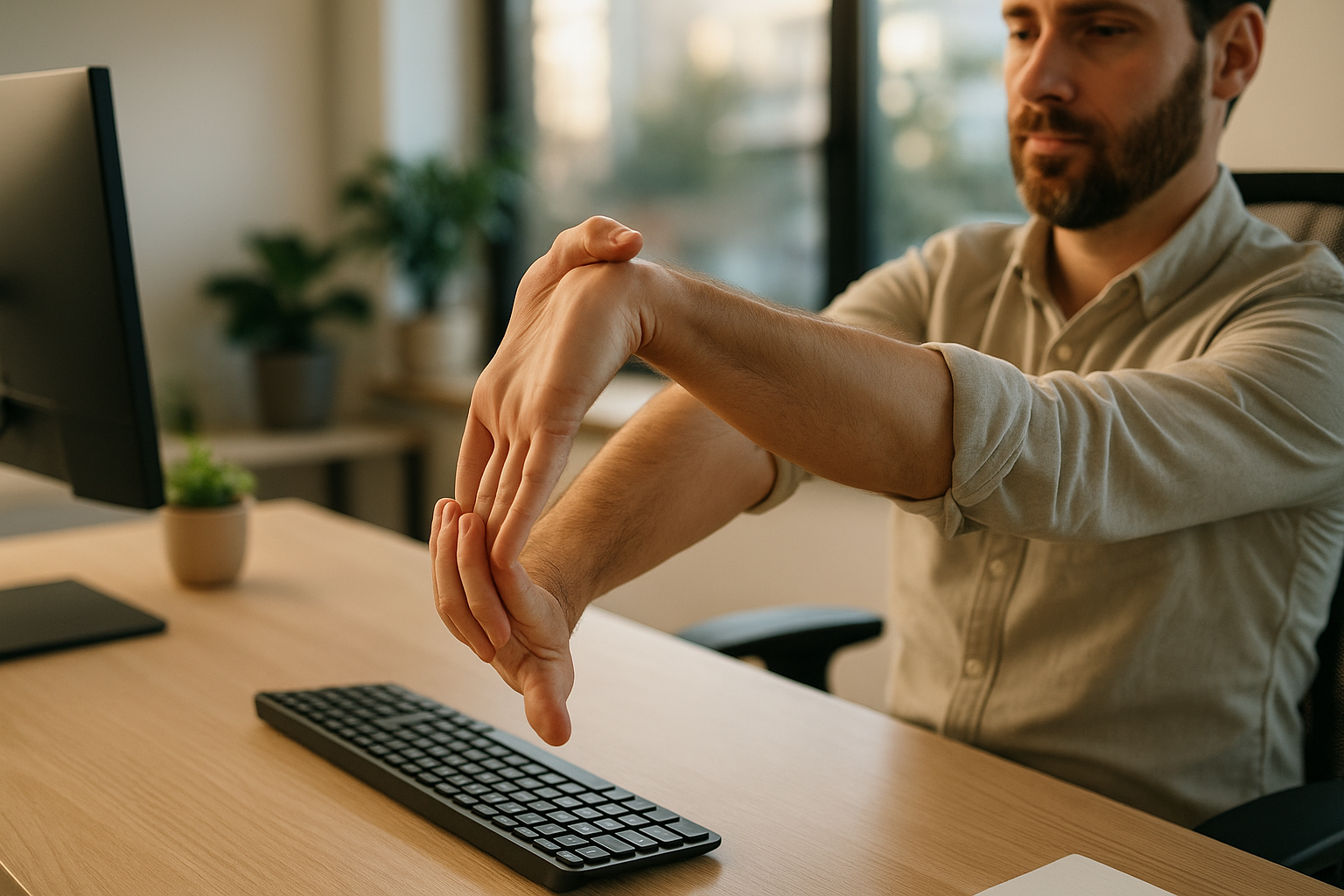
This classic pair addresses the front and back of the forearm—the muscles you load with every keystroke and scroll. Begin with a gentle warm-up: open/close your hands 10 times and circle your wrists. For the flexor stretch, extend one arm forward, elbow straight, palm up; gently pull your fingers back with the other hand until you feel a mild stretch along the palm side. For the extensor stretch, flip the palm down and gently pull your hand toward you until you feel the top of the forearm lengthen. Hold each 15–30 seconds, repeat 2–4 times per side. Research indicates 15–30-second static holds are effective for flexibility, and AAOS handouts for elbow/wrist overuse prescribe similar parameters. Keep the intensity light: you should feel tension, not pain or pins-and-needles.
3.1 How to do it
- Flexor stretch (palm up): elbow straight, gently pull fingers back; hold 15–30 s; 2–4 reps.
- Extensor stretch (palm down): gently flex wrist toward you; hold 15–30 s; 2–4 reps.
- Breathe steadily; shoulders down and relaxed; stop if numbness or tingling appears.
3.2 Common mistakes
- Bending at the wrist only partway and forcing the stretch—keep the elbow straight for a true forearm stretch.
- Cranking too hard: aim for 3–4/10 intensity, never pain.
Synthesis: Two simple holds, a minute or two total, can dissolve the “tight forearm” feeling and prep you for precision work.
4. Finger Tendon Glides (Free Up Stiff, “Keyboardy” Fingers)
Tendon glides move your finger flexor tendons through their sheaths to reduce morning stiffness and improve dexterity. They’re especially helpful when your hands feel puffy or “catchy” after long typing bouts. Sit tall with the forearm supported on the desk. Move through five positions: (1) straight hand, (2) table-top (MCPs flexed, IPs straight), (3) hook fist (IPs flexed, MCPs straight), (4) straight fist (MCP and PIP flexed, DIP straight), and (5) full fist. Hold each position ~3 seconds, complete 5–10 cycles, 1–2 times per day. Authoritative hand-surgery and orthopedic resources publish nearly identical series for desk-related hand stiffness and carpal-tunnel-related symptoms. Keep the wrist neutral and motions smooth—this is gliding, not gripping.
4.1 Mini-checklist
- Wrist neutral; forearm supported.
- Move smoothly through the five shapes; hold ~3 s each.
- Breathe; shoulders soft; no forcing end-ranges.
4.2 Case example
- After a 2-hour spreadsheet session, do 2 rounds per hand (about 2 minutes). Most people notice easier typing and fewer “sticky” keystrokes on return.
Synthesis: Tendon glides are low-effort, high-payoff—think of them as “joint floss” that keeps finger motion clean for fast, accurate typing.
5. Median Nerve “Flossing” (Gentle, Symptom-Aware Version)
If you experience intermittent tingling in the thumb, index, or middle finger, gentle median nerve glides may help—when performed carefully and only within comfort. Start with the arm by your side, elbow bent, wrist neutral, fingers and thumb curled into a loose fist. Progressively open the fingers, extend the wrist a touch, then rotate the forearm to palm-up; if comfortable, gently extend the thumb and tilt the head slightly away for a light tensioning effect. Keep every step mild: you should feel only light pulling that eases when you back off. NHS and hospital physiotherapy leaflets emphasize that nerve glides should not provoke sustained pain or worsening symptoms; stop and consult a clinician if tingling intensifies or persists. Use 5–10 gentle reps, 1–2 sets, once daily during symptomatic periods. elht.nhs.uk
5.1 How to do it
- Sequence: loose fist → fingers straight → slight wrist extension → palm up → thumb open → optional neck tilt away.
- Tempo: slow, 2–3 seconds per link; back off if symptoms spike; exhale as tension rises.
- Dosage: 5–10 reps; 1–2 sets; once daily for 1–2 weeks—monitor response.
5.2 Safety notes
- Nerve glides are not stretches to “hold”; they’re oscillations—move in and out of light tension.
- Stop if symptoms worsen or persist; seek evaluation.
Synthesis: Use nerve glides like a dimmer switch, not an on/off lever—small, symptom-aware movements can reduce sensitivity without irritating the nerve.
6. Strengthen What You Use All Day: Wrist Flexion/Extension, Deviation, and Rotation
Strength builds durability. Light resistance for the wrist—flexion, extension, ulnar/radial deviation, and forearm pronation/supination—helps your hands tolerate long days without flaring. Begin with a 0.5–1 kg (1–2 lb) dumbbell, water bottle, or hammer. Support the forearm on the desk edge so the wrist is free to move. For flexion and extension, move slowly through pain-free ranges; for ulnar/radial deviation, start with the thumb side up; for pronation/supination, hold the end of a hammer so leverage is modest. Perform 8–12 slow reps, 1–2 sets each pattern, three days a week. NHS hand-therapy instructions outline these moves with clear positions and progressions, and they’re widely used in clinic to restore strength after overuse.
6.1 How to do it
- Flexion/extension: forearm supported, wrist free; move up/down slowly, 2–3 s each way.
- Ulnar/radial deviation: thumb up; “chop” down to little-finger side, then up to thumb side.
- Pronation/supination: hold a hammer near the head for less leverage; rotate palm up/down.
6.2 Numbers & guardrails
- Start 1–2 sets of 8–12 reps, 3x/week; rest 48 hours between strength sessions.
- Keep pain ≤3/10 and stop if sharp; progress weight gradually (e.g., +0.25–0.5 kg weekly).
Synthesis: A few minutes of strength work builds “all-day stamina” in the tiny movers you overuse—think prevention, not rehab.
7. Thumb Care (Abduction, Opposition, and “Mouse Muscles”)
Your thumb drives scrolling, trackpad clicks, and phone swipes; it’s also the usual suspect in De Quervain’s irritation. Protect it with controlled abduction (moving the thumb away from the palm), gentle opposition (thumb to each fingertip), and light resistance once comfortable. A simple elastic band or therapy putty adds enough challenge to build resilience without strain. NHS hand therapy guidance for De Quervain’s includes active thumb abduction and progressive banded work; start with the lightest resistance and keep your wrist neutral to avoid “cheating” with the forearm. Try 2 sets of 8–12 reps for three variations: abduction, opposition presses, and isometric “thumbs-up” holds against gentle resistance.
7.1 Mini-routine (3–4 minutes)
- Abduction: thumb moves away from index; return slowly.
- Opposition: press thumb to index/middle/ring/little fingertip; add putty pinch if easy.
- Isometric “thumbs-up”: press thumb upward into a light band for 5–8 seconds; 5–8 holds.
7.2 Common mistakes
- Letting the wrist bend: keep it neutral so the thumb does the work.
- Jumping to heavy bands: progress only when form is smooth and pain-free.
Synthesis: Give your most overworked digit some love; strong, coordinated thumbs make mousing and mobile use feel effortless.
8. Putty & Rubber Bands for Grip and Finger Balance (Small Tools, Big Return)
Therapy putty and simple elastic bands target the small hand muscles you rarely train but use constantly. Use putty for squeezes, pinches, and opposition; use a rubber band looped around the fingers for gentle opening (extension). Start with 1–2 minutes of gross grip (squeeze a putty ball), 1 minute of tip and key pinches (thumb to each finger), then 1 minute of finger spreads (either stretching the putty “donut” or opening against a rubber band). Hospital leaflets and hand-therapy organizations provide clear home programs; they’re affordable and scalable by color-coded resistance. Keep reps slow, focus on smooth pressure, and avoid “white-knuckle” squeezing that aggravates tendons. Aurora Health Care
8.1 How to do it
- Gross grip: 2 sets x 10 slow squeezes, 2–3 s hold.
- Opposition pinches: thumb to each fingertip through putty, 8–10 reps each.
- Finger extension: open fingers against a band or putty donut, 2 sets x 12.
8.2 Numbers & guardrails
- Frequency: 2–3x/week on nonconsecutive days to build strength without tendon flare.
- Intensity: light-to-moderate resistance; stop if you feel sharp pain or joint clicking. OrthoNC
Synthesis: Tiny tools train tiny muscles—balanced grip and finger extensors stabilize your wrist during long bouts of typing and mousing.
9. Self-Massage & Recovery Mini-Ritual (Short-Term Relief, Not a Cure-All)
Self-massage can ease short-term tension in the forearm flexors/extensors and palms, especially late in the day. Use a small ball (e.g., tennis or lacrosse) and spend 30–60 seconds rolling tender spots on the forearm, then open/close your fist 10 times to re-check movement. Evidence maps and systematic reviews suggest massage and self-myofascial release can provide short-term pain relief and increase range of motion, while long-term outcomes vary and quality of evidence ranges from low to moderate. That’s fine—think of this as a comfort tool layered on top of your exercise habit, not a replacement. If symptoms are nerve-like (tingling, numbness), skip deep pressure and use the nerve-glide approach from Section 5 instead.
9.1 Mini-routine (2–3 minutes)
- 30–60 s roll on palm, then forearm flexors; 30–60 s on extensors.
- Follow with 10 wrist circles each direction and 5 tendon-glide cycles.
- Hydrate, then shake out hands for 10 seconds.
9.2 Guardrails
- Aim for “hurts so good” (3–4/10). Skip bruising pressure.
- Massage works best as part of a program that also includes strength and mobility.
Synthesis: Use self-massage to turn down discomfort now—then keep mobility gains with the stretching, gliding, and strength work above.
FAQs
1) How often should I do these Wrist and Hand Mobility for Desk Workers exercises?
Most people do well with a light daily mobility block (Sections 3–5) and 2–3 strength days (Sections 6–8). Layer in microbreaks hourly. If you’re flared up, cut volume in half for a week and focus on gentle glides plus neutral posture until symptoms settle. HSE endorses frequent short breaks; lean into those while you re-build.
2) Are wrist rests good or bad?
They’re fine between typing bursts (contacting the heel of the palm), but you should float your hands while typing so you don’t compress the wrist. Choose a low, firm rest and use it sparingly—adjust your chair, desk, and keyboard first to reduce bending.
3) What if my fingers tingle during drills?
Stop any stretch that increases tingling. Switch to gentle median nerve glides and keep movements within light, easing tension—never hold nerve positions. If tingling persists, consult a clinician; nerve symptoms need tailored care.
4) How long should I hold stretches?
For muscle stretches like the wrist flexor/extensor pair, 15–30-second holds for 2–4 repetitions are reasonable starting points, based on flexibility guidance and rehabilitation handouts. Keep intensity light and avoid forcing end ranges. OrthoInfo
5) Are tendon glides and nerve glides the same thing?
No. Tendon glides move your finger flexor tendons through their sheaths (great for stiffness and dexterity). Nerve glides gently mobilize nerves and must be symptom-aware—move in and out of light tension without holds. Follow hospital leaflets closely for nerve work.
6) Do I need special equipment?
Not really. A lightweight dumbbell or water bottle, a rubber band, and therapy putty cover most needs. A small ball helps for self-massage. Start with light resistance and progress slowly as form improves. NHS and hospital programs commonly use exactly these tools.
7) What mouse or keyboard is best for wrist comfort?
Pick gear that lets you stay neutral: low-profile keyboards, a mouse that fits your hand without gripping, and placement close to your body. Reaching and wrist bend are the enemies. National ergonomics bodies emphasize posture and proximity over brand.
8) How soon will I feel better?
Many feel relief the same day from microbreaks and gentle stretches; strength benefits build over 2–6 weeks. If you don’t improve after 2–3 weeks—or symptoms worsen—speak with a clinician to rule out conditions like carpal tunnel syndrome or tendinopathy.
9) Can I do all nine items daily?
You can, but most people rotate: posture + microbreaks daily; tendon/nerve glides daily or as needed; strength and putty work 2–3x/week. Total time stays sustainable (10–15 minutes/day) while still progressing.
10) What if my job is all trackpad and no mouse?
Trackpads often push the wrist into extension and the thumb into repetitive abduction; double-down on Sections 1, 2, and 7. Consider an external mouse to vary loads and keep the trackpad centered and low to avoid ulnar deviation.
Conclusion
Your wrists and hands are small engines powering nearly every knowledge-work task you do. The formula to keep them happy isn’t exotic: a neutral desk that doesn’t fight you, frequent short breaks to keep tissues fresh, and a compact set of stretches, glides, and strength moves you’ll actually repeat. Start with Sections 1 and 2 today—they immediately lower strain. Add the flexor/extensor pair and tendon glides to dissolve stiffness in minutes. Over the next two weeks, sprinkle in the gentle nerve glides if you’ve had occasional tingling, and build twice-weekly strength for lasting resilience. Track how your hands feel at the start and end of each day; if discomfort dips and dexterity rises, you’re on the right track. If not, reduce volume, refine posture, and get a professional check. Your next step is simple: set a 30-minute nudge, save this routine, and do your first 90-second reset now. Copy-ready CTA: Pin this 9-move routine by your monitor and do the 60-second reset after your next meeting.
References
- Computer Workstations eTool – Good Working Positions. Occupational Safety and Health Administration (OSHA). n.d. OSHA
- Computer Workstations eTool – Components: Keyboards. OSHA. n.d. OSHA
- Working safely with display screen equipment – Work routine. Health and Safety Executive (HSE). March 20, 2025. HSE
- Working safely with display screen equipment (Overview). HSE. March 20, 2025. HSE
- When workers heed computer’s reminder to take a break, their accuracy improves. Cornell University News. September 23, 1999. news.cornell.edu
- Ergonomic Management Software and Work Performance. Cornell Human Factors Lab (A. Hedge). 2001. PDF. ergo.human.cornell.edu
- CURRENT CONCEPTS IN MUSCLE STRETCHING FOR EXERCISE AND REHABILITATION. Int J Sports Phys Ther. 2012;7(1):109–119. PMC
- Therapeutic Exercise Program for Carpal Tunnel Syndrome. OrthoInfo—American Academy of Orthopaedic Surgeons (AAOS). Handout PDF, last reviewed c. 2018. and PDF link therein. OrthoInfo
- Common Hand and Finger Exercises (Differential Tendon Gliding). American Society for Surgery of the Hand (ASSH). May 21, 2020 (PDF 2019). assh.org
- Median Nerve Glide Exercises. Sussex MSK Partnership (NHS). 2024. PDF. sussexmskpartnershipcentral.co.uk
- Median Nerve Gliding (Patient Information). St George’s University Hospitals NHS Foundation Trust. October 2024. PDF. St George's NHS Trust
- Hand Therapy – De Quervain’s Tenosynovitis (Inflammation of the Tendons of the Thumb). North Tees and Hartlepool NHS Foundation Trust. August 12, 2025. nth.nhs.uk
- Hand Therapy – Wrist strengthening (Patient Information). University Hospitals Coventry and Warwickshire NHS Trust. 2024. PDF. uhcw.nhs.uk
- Office Ergonomics – Computer Mouse: Selection and Use and Common Issues. Canadian Centre for Occupational Health and Safety (CCOHS). n.d. and https://www.ccohs.ca/oshanswers/ergonomics/office/mouse/mouse_problems.html CCOHS
- Office Ergonomics – Wrist Rests. CCOHS. n.d. CCOHS
- Massage for Pain: An Evidence Map. Pain Med. 2019. and Effects of Self-Myofascial Release on Athletes’ Physical Performance. Medicina (Kaunas). 2024. https://pmc.ncbi.nlm.nih.gov/articles/PMC10801590/ PMC
- Therapeutic Putty Exercises (Patient Leaflet). St George’s University Hospitals NHS Foundation Trust. 2021. PDF. St George's NHS Trust